
🔔 How to get Nextcloud notifications for available system updates
März 17, 2017
- Update 2024-10-03: Utilizing features of Nextcloud 30 and later.
- Update 2017-04-21: Also works on Raspbian and others now.
Keep your server up to date and receive a notification in your Nextcloud when php, apache, etc. need an update with this little script.
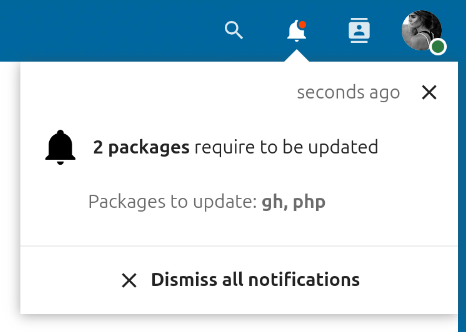
-
Create
system-notifications.shwith the following content on your system, and make sure to adjust the path to your Nextcloud/var/www/nextcloud/occas well as your admin account name:#!/usr/bin/env bash # # SPDX-FileCopyrightText: 2017-2024 Joas Schilling <coding@schilljs.com> # SPDX-License-Identifier: MIT ADMIN="admin" OCC_PATH="/var/www/nextcloud/occ" PACKAGES=$(/usr/lib/update-notifier/apt-check -p 2>&1) NUM_PACKAGES=$(echo "$PACKAGES" | wc -l) if [ "$PACKAGES" != "" ]; then UPDATE_MESSAGE=$(echo "$PACKAGES" | sed -r ':a;N;$!ba;s/\n/, /g') NOTIFICATION_ID=$($OCC_PATH notification:generate $ADMIN \ "{packages} require to be updated" --short-parameters "{\"packages\":{\"type\":\"highlight\",\"id\":\"count\",\"name\":\"$NUM_PACKAGES packages\"}}" \ -l "Packages to update: {list}" --long-parameters "{\"list\":{\"type\":\"highlight\",\"id\":\"list\",\"name\":\"$UPDATE_MESSAGE\"}}" \ --object-type='updates' --object-id='apt' --output-id-only) echo "$NOTIFICATION_ID" > apt-notification-id.txt elif [ -f /var/run/reboot-required ]; then NOTIFICATION_ID=$($OCC_PATH notification:generate $ADMIN "System requires a reboot" echo "$NOTIFICATION_ID" > apt-notification-id.txt else NOTIFICATION_ID=$(cat apt-notification-id.txt) $OCC_PATH notification:delete $ADMIN $NOTIFICATION_ID fi -
Add the script to the cronjob
crontab -u www-data -e0 5 * * * /path/to/file/system-notifications.sh
Leave comments in the Nextcloud forum.
[Update] Raspbian and other systems
If your operating system does not support apt-check, you can also try to replace the line:
PACKAGES=$(/usr/lib/update-notifier/apt-check -p 2>&1)with:
PACKAGES=$(apt-get -s dist-upgrade | awk '/^Inst/ { print $2 }' 2>&1)This at least made it work on my Raspberry Pi which runs Raspbian.
Nextcloud 29 or older
Few of the options used above are only available in Nextcloud 30 and newer. So here is a version that works on older versions. It comes with the disadvantage of not replacing and removing the old notifications when a new one is triggered:
#!/usr/bin/env bash
#
# SPDX-FileCopyrightText: 2017 Joas Schilling <coding@schilljs.com>
# SPDX-License-Identifier: MIT

ADMIN="admin"
OCC_PATH="/var/www/nextcloud/occ"

PACKAGES=$(/usr/lib/update-notifier/apt-check -p 2>&1)
NUM_PACKAGES=$(echo "$PACKAGES" | wc -l)

if [ "$PACKAGES" != "" ]; then
    UPDATE_MESSAGE=$(echo "Packages to update: $PACKAGES" | sed -r ':a;N;$!ba;s/\n/, /g')
    $OCC_PATH notification:generate $ADMIN "$NUM_PACKAGES packages require to be updated" -l "$UPDATE_MESSAGE"

elif [ -f /var/run/reboot-required ]; then
    $OCC_PATH notification:generate $ADMIN "System requires a reboot"
fi